I was lost, but now I’ve found my way.

I have been spending the last couple of days playing around with the Magellan GPS software. A long time ago . . you know way back in time, like two years ago… I created a custom POI file for all the sites at the company for which I work. Now when I travel to them I can just select a “Custom POI” file and go! Also helps getting there from hotels, airports, etc.

Then last weekend we went for a drive to see the fall foliage, and had a hunger for a Starbucks coffee. Even with 9,000 or so of them in the US it isn’t always easy to find one. When we got back home I did an internet search and found a POI file for all the Starbucks in the US! Perfect, just what I wanted, a complete list to upload into the GPS!

BUT…., isn’t there always a “but” . . . there is a problem in getting them from the standard downloadable file format into the Magellan. Downloading a .CSV file works okay, and the Magellan POI program imports them okay. The first time I did this, I immediately imported it into the Magellan GPS and it worked like a charm. Then I saw the crazy descriptions for each location in the unit and decided I would clean them up. Since many of the descriptive names are longer (I think the Magellan limits it to about 16 spaces.) it would truncate the description in the unit and look strange and of no real help anyway. So I opened the .CSV file in Excel and changed all the names to “Starbucks”, nice and simple. Reimported into the Magellan POI software, saved everything and closed down for the night.

The next day getting ready to upload to the GPS unit, I opened my file again, and crap . . . it only had about four locations in it, when it should have had thousands! What the heck, well I must have saved it wrong, or maybe with the wrong name, or I opened the wrong file and so on. So I recreated the file again, carefully saving it as an ASCII .CSV file in a known location. Everything looks great now. So closed things down until I got the GPS unit to upload to later. Okay, now I am again ready to update the unit, so I open the Magellan POI software, open the carefully saved .MGLN file (special Magellan format they create within the software) and . . . . CRAP!! It is missing all the data except the same stinking four locations. Okay, go through the whole process again, check the locations before and after the ones that show up… they look fine. No strange characters, no extra commas (comma delimited .CSV file) everything is perfect, so save the file, reopen it and look at the beautiful work that I did . . . . CRAP! Gone again. Now being a fast learner and all I went through this process about 8 times with the exact same results everytime. (Insanity = doing the same thing you have always done and expecting different results. ) Finally gave up on it and went back to reading a book. Couldn’t get this out of my mind though…. so kept thinking about it… what is different this time than before…. first time I saved it, and then immediately uploaded into the Garmin… but why should that make a difference? Oh, the other thing I did was “clean up” all the long descriptive file names. . . . hmmm. . . . If every name is now just “Starbucks” and originally they were “Starbucks at the corner of 5th and 27th Street in Madison Wiscon….” what is the difference… okay now ALL the descriptions are exactly the same…. hmmm…. Back to Excel, import the .CSV file, delete all the descriptions, put in “Starbucks 000001” and then drag down the column changing each description to “Starbucks 00001”, “Starbucks 00002”, “Starbuck 00003” and so on….. now save it in Excel. Open it in Magellan POI editor, save it, exit and reopen the MGLN file again. Hot Dang… there they all are!
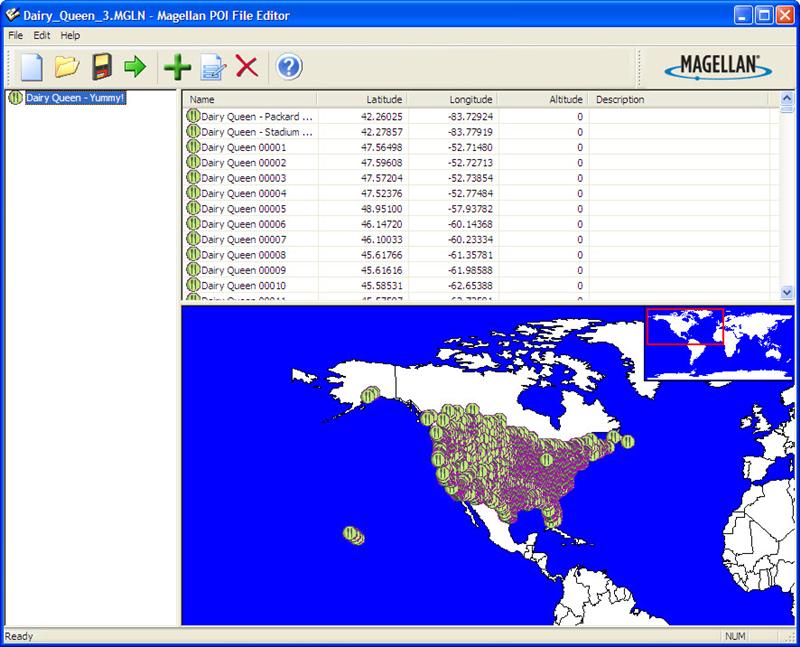

Magellan POI Software

The interface for the Magellan POI software is pretty simplistic. When you load up a file it shows all the locations… and if you have reversed the latitude and longitude it shows up real quick! What a DQ in the middle of the South Atlantic! Must be one they opened on an cruise ship going to Antartica.

The other thing I realized as I went through all of this, when I tried the GPS with the original downloaded points it did not find some that I thought for sure should be there… like right down the street from the house. Again I assumed the file would be correct, and there must be some reason they were not included, like it is inside of a store, not a stand alone building or it is to new to be included, and so on. What I now realize is that all the descriptive names that ended up being truncated leaving the exact same description were skipped from the file. Maybe it is thinking that location is already in the file so is attempting to be helpful by not saving duplicates….. so a lot of locations ended up with similar descriptions and therefore not included.

With this great success I looked up the next most important, or actually maybe even THE most important locations to find on a trip…. ALL the Dairy Queen’s in the USA! I now have a file loaded into the GPS so we can immediately locate a DQ for a quick sugar fix whenever we need it on the road! WOOT! Instant ice cream locations, all 5,332 of them!

Next project: Programming all the Parks, lodges and major attraction at Disney World in Orlando… the only “ready made” file I found only has the theme park locations in it. I want the Disney resorts, lodges and other things like International Village and the “Shops”, along with nearby attractions of interest… and the hotel we like there.

Until the final satellite burns up on reentry,

George
Software and Running = Part 4

Okay so I love the Garmin and it makes recording the results of training and races such as tracking mileage, time, pace, heart rate and so on so simple.

. . . but it seems I often sometimes once in a blue moon forget to hit the “stop” button at the end of the race/workout. I am usually so excited that I made it to the end without passing out that thinking about stopping the watch doesn’t occur until my brain gets oxygenated enough to think of things like that!

I just ran the greatest race of my (very short) running career! All the stars, moons and planets were in perfect harmony with Mother Nature and my circadian rhythm. When I crossed the finish line and saw the timer and heard the beep of the timing mat I knew I had just officially set a new PR!! Elated I get the timing chip off the shoe without falling over, I stagger over and grab a bottle of water, a banana, a handful of cookies single very small sized cookie, and start to regain focus in my eyes. Dang it all, the watch is still running, and now the pace appears to be super slow, and the GPS track looks like a drunken ant has crawled around on my computer screen. Now, what to do…. The Garmin Training Center software is useless, it will grab the data from the watch, record it and that is about all. I can download the data from the watch to SportTracks, see all the data and the map UGH!! Look at that mess! Ah HA! SportTracks will let me split an entry! So I lop off the extra data based on a careful analysis of the time or distance looking at the expanded map, delete the overage “split” and now I have my official time and the run in SportTracks looking pretty good. But that doesn’t help me in either Garmin Training Center or Runners Studio, since I can only export in Fitlog or CVS and cannot import anything other than a TCX file into Runners Studio.

TCX Converter to the rescue! I found a reference to this software on a blog and tried it out. After several false starts I got the combination of exports and imports down to where it is not all that difficult to edit and save a file.
• Import run data into SportTracks.
• Split the run at the correct point.
• Delete the extra split that shows up now.
• Export from Sport Tracks as a “fitlog” file. (Which seems to be the one that saves all the data including Heart Rate information.)
• Import the new XXX.fit file into TCX Converter.
• Save as a new TCX file.
• Import the data into Runners Studio as a new run.
(Oops problem here is right now I cannot import as a “Race” which is different than a workout, and a workout apparently cannot be converted to a race once it is in Runners Studio.) Hopefully there will be a cure for that in the next release of Runners Studio. It may just be an oversight that only CVS files can be imported as a Race, since there isn’t much difference between a workout and a race.

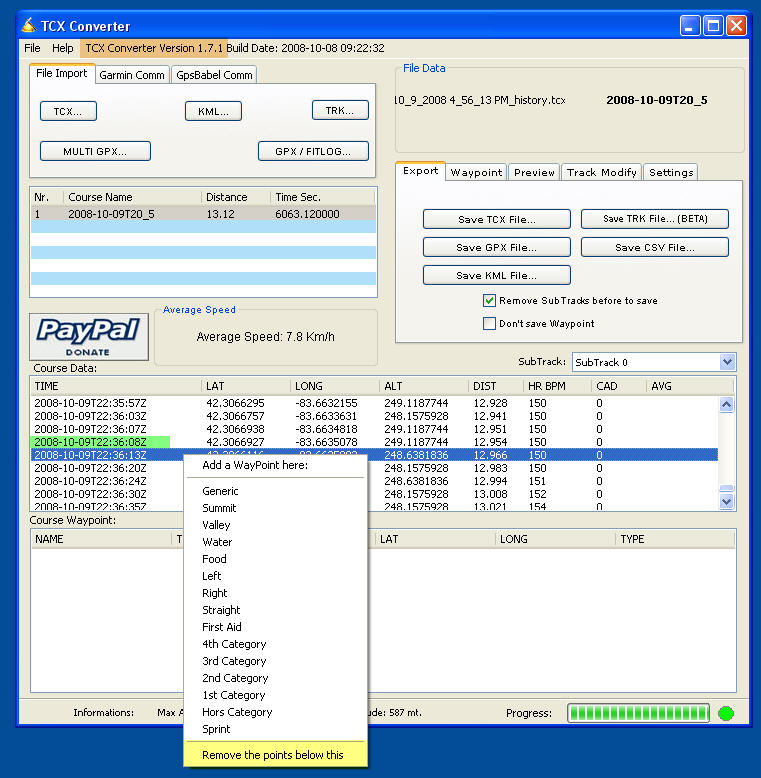
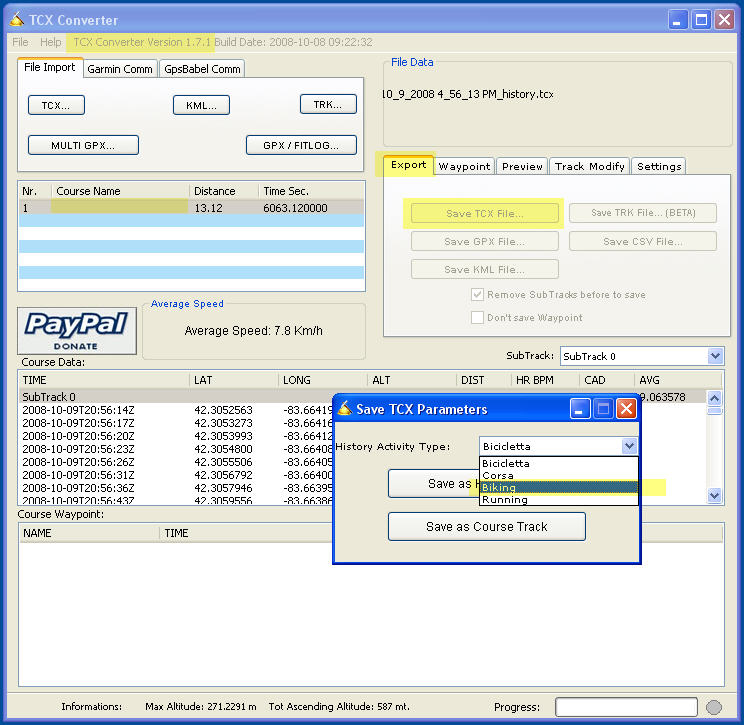
In the following picture I have removed the course name so it is blank, I have selected the “Export” tab and then the “Export as TCX”, which then gives me the option to select the Activity Type from a pick list.

Click on the picture to see a larger image.

Net result is that I am happy all the way around, thanks to the TCX Converter utility. Now, if they would only add the ability to trim a file right inside of TCX Converter I would have “the perfect solution”. Since it can already read the data from the Garmin FR 305 directly, it would make it a import, trim and export operation which could be used by the other programs!

You can check out TCX Converter at
Unless you read Italian use the “Convert to English” button.

UPDATE: The latest version of TCX Converter is 1.7.1, it now has the ability to cut off the excess time! It can also change the type of activity since it seemed like I was getting a default value that I did not want.
Looking at the points find the time you want to end the track at, and just right click and select the “Remove the points below this” option from the drop down.

Click on the picture to see a larger image.
Until the last time I forget is forgotten,

George

Software and Running = Part 3

Continuing review of the equipment I use to create, track and record my workout efforts.
Here is a review of SportTracks software.

While I really like the Runners Studio software for tracking all the workouts, races and planned races when I started it did not do quite everything I wanted, such as data import from Garmin, create maps of routes, etc. Even though many of those items are available now, I still put the data into another program, SportTracks. The approach taken with this software is a little different, it is open for the user community to create “plug-ins” much like the WordPress blog software allows. This allows the creativity of the entire user community to think up ways to enhance and improve the basic software. (Not that it is particularly lacking, just that 5,000 heads are better than one.)

The software with all its plugins (currently there is something like 42 different ones listed) makes for a lot of options! The downside to all this is, for me anyway, not as intuitive use as Runners Studio. Using a series of views, each one which can do different things requires some clicking around to get it to show what you desire it to. Then within the view there are options also. You have to pay attention to all the “triangles” which you use to open up the different options. I wrote in to the forums asking about editing an event after searching for some time, the answer, which was polite, but made me feel sort of dumb, just click on the triangle after the “Event” and make your choice. D’oh.

After months of use I still find the ability to download data from a GPS you wear on your wrist and create a map of the activity accurate to within feet of where you walk on the entire planet to be pretty amazing. ????? ?????? (maybe I am just easily impressed or amazed.)

Sport Tracks is really good, but have not found a good way to schedule future races in it. There are some plug in’s that will let you do it, but not the way I want it, and even if you get it, you have to dig down through several menus to find it. Conversely Runners Studio puts them right on the home page so you can see them quite easily. Actually there is not a good “home page” for Sport Tracks, maybe something that could be considered. ??????????? ??????? A simple overview of the major things tracked. Weekly mileage, shoe use, upcoming races, even maybe a way to check which things the user would like to see. Sort of how iGoogle page creation works.

You can check out what they have to say about Sport Tracks and download an evaluation version from https://www.zonefivesoftware.com/SportTracks/.

There are several other solutions, most of which are web based. These have the advantage of access from anywhere, or any computer, the down side of not being able to access from behind a firewall (like at work) or if the site decides to go to a paid version, or worse close the doors. ????? ??? ???? Your years of data could be gone. They may be nice and allow an export of all the data, but then again . . . or even if they do would it be in a format compatible with another program.

Until the final waypoint is created,
George

Next TCX Converter.

Software and Running = Part 2

In which I continue the monologue on equipment and software I use to track exercise efforts.

Software for recording Running and Races. The first software I got for tracking workouts and races was Runners Studio. I have been using it for about nine months at this point. I really like the layout of the software, it is easy to navigate and has a nice visual appeal. One of my favorite features is the “upcoming race” calendar/listing.  You can enter races that you want to run or are thinking about running into the software and it lists them all in a page view. The view includes customizable columns so you can add/remove what you want to see, or rearrange the order of the columns. The entries may also be sorted by different columns such as date of race, have you registered yet, length of race, etc. The view also shows the number of days remaining until race day, a very handy visual to use for planning. It also quickly reminds you of how many days there may be between races, so if you need to set priorities it is easy to do.

A short list of my favorite features:

  • Import data from Garmin Training Center. Much easier than entering all the lap data manually, also includes elevation, heart rate, etc.
  • Track run data from GPS using Google Earth with a click of the mouse.
  • Track shoe useage to see how many miles you put on them.
  • Goals you can set for about any combination of miles, time, pace, weight, etc
  • Mega-Goals which can be set to see how far you run in total, can you make it around the world? I’m just working on getting from California to New York…..
  • Upcoming races which I mentioned.
  • Race history which lists all the races you have entered, your goal and the results.

I could list everything the program does, but it would be easier for you to visit his web page, read what he has to say, and then download the software and try it out!

The program is constantly being updated, and the author seems receptive to adding new features that are requested as he has done for my requests several times. There is still a “wish list” I have for him, but it is getting closer to my ideal program with every revision!

Software and Running = Part 1

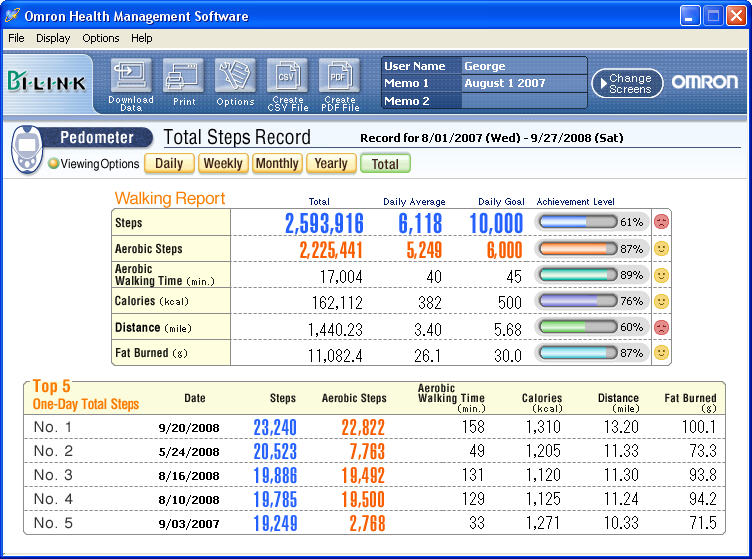
When I started exercising more the first thing I bought was a fairly simple pedometer. It is a Omron Model HJ-720ITC which has the ability to export data into it’s own software tracking program. The first entry was August 1, 2007.

As of today I have more than 1,450 miles and 2,600,000 steps recorded in the last 14 months. Note that the miles is probably not all that accurate since the stride length used to calculate distance was set up for a walking pace, and my running stride is somewhat longer, so the distance shown is correspondingly shorter. I use this mostly as a reference number so am not disturbed with the inaccuracy knowing in my mind that I have run far more than the pedometer indicates.

+++++
Click on the picture to see a larger image.
Pocket Pedometer with PC software HJ-720ITC
Omron’s most technologically advanced pedometer, model HJ-720ITC, now includes Omron Health Management Software to help you track days, weeks, months and years of exercise. Simply connect the pedometer with its USB connection to your PC to begin tracking your health today. The pedometer measures steps, aerobic steps (10 minutes or more of continuous movement), calories and distance. Your path to better health is just steps away.

+++++

I still wear the pedometer when I exercise whether it is running, walking, treadmill, etc. I do not wear it all day which a lot of people do, but I am more interested in seeing what efforts I expend outside of normal activity.

The plus’es to the pedometer are that it resets automatically every day at midnight so you do not have to remember to reset it to capture the daily steps. Another plus is it seems very accurate in picking up steps. It does not seem overly sensitive as to where it is kept or worn while in use.

The negatives to the pedometer. It resets itself every night, and only every night. It cannot be manually reset. If I transport the pedometer it will begin counting steps before I begin an exercise period and it cannot be zeroed before I begin. Sometimes this can add a significant amount of steps. To some degree they can be ignored since they typically are not “aerobic” steps, and I mainly track only aerobic activity. But it does mess up totals. Another negative is that it is very sensitive, and will pick up steps wherever it is located…. including in a suitcase or even sitting on a car seat. This is what adds “unearned” steps. Basically the strengths are also the undesired traits.

The plus’es of the ability to download all the activity into the software outweigh the negatives, at least for my use.

If anyone is aware of  a pedometer on the market that can be manually reset and also downloads daily data to a PC please let me know! Until I find one the Omron Pedometer gets the Team Toe-Jammer seal of approval.

Until the final foot fall falls over the land,

George

Kensington 15K – Ann Arbor Track Club – AATC

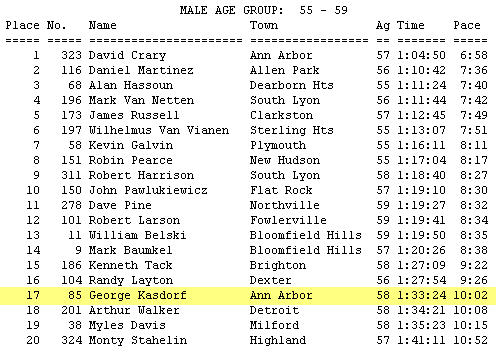
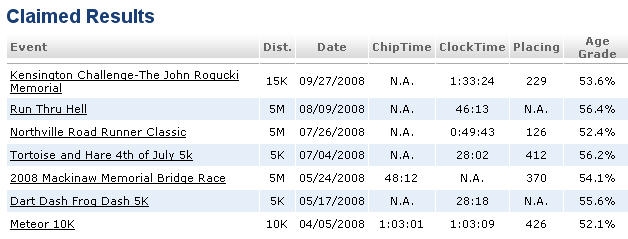
A first for me, a 15K or 9.2 mile race. Longest race to date! Having done a few training runs of 10-12 miles I decided I could tackle this race. I am happy to say the ambulance did not carry me off, and while I would have liked to finish higher in my age group, overall I am in the top 50% (48% actually). Again this shows the fitness level of 55-59 year olds that I am up against! In that group I was 17 out of 20 which puts me in the bottom 15%! A big difference.

Kensington Metro Park is one of the larger, if the not largest in the area. It encompasses the large lake and is quite a nice setting. Lots of activites we may try some time, horseback riding, biking and maybe even some walking.  You can see the pictures of the park and the race Since the path loops the lake there are not so many of the actual race.

The Kensington Challenge 15K

By the numbers

By the numbers:

a) 15 Kilometers = 9.2 miles.

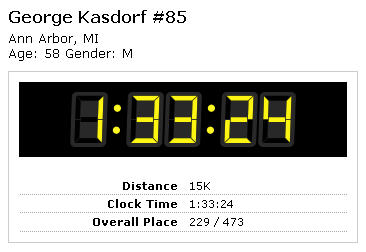
b) ran at a 10:02 per mile pace, 1:33:24 total time.

c) finished 229 out of 473 overall, so finished in the top 48% of all runners.

d) finished 17 out of 20 in my age group.

e) had a great time, which was the real race goal!

The race went great, a new PR for me, and a pretty good pace.

From Last Post:

You know, I am sorta getting an urge to try a half marathon… but trying to resist until next year. Just barely doing the 5 mile thing right now. Maybe I will try a 10 miler before I make the jump. There should be some coming up yet this year. We’ll see.

Okay, that’s done, now do I go and try the Detroit Free Press Half Marathon in October?

Web site tracking of races.

The race is in it’s 25th year and is presented by the Ann Arbor Track Club. https://www.aatrackclub.org/

Until the final winding path is run and the hills are all level,

George