Detroit Turkey Trot – The rest of the story.

I wrote in the last post about the new technology used, the disposable RFID chip on a strip. I also noted that the “Chip Timed Start” . . . did not start!

In the last post I wrote:

UPDATE 11/30/2008:
Attn: Active.Com

I just wrote the following email to the Active.Com web site contact regarding the chip timed start issues. Will see what happens.

================= Start of eMail Sent ==================
UPDATE 11/30/2008:
Greetings,

I am writing to ask about getting my time for the Detroit Turkey Trot 10K adjusted.
It seems that my chip did not get recorded at the start of the race, and included the time from the gun to when I actually was able to cross the timing mat.

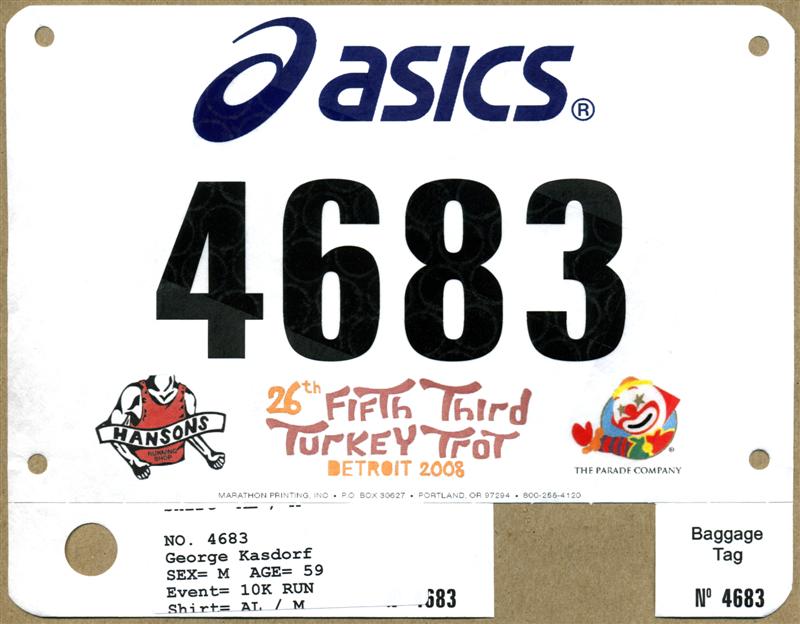
My bib number was 4683, and the time posted was 01:01:38.
My stop watch time was 00:58:02.
As confirmation I have a picture of me crossing the start line at 8:04:54
https://www.kasdorf.name/wordpress/2008/detroit-turkey-trot-10k-2008/#more-384

The difference is not the entire 4:54, since I believe a video I have also shows the race gun did not sound until about 8:01:22 (approximately, you may know the actual start time showing on the clock.)
The difference of the two is about 3:33, which when subtracted from the finish time of 1:01:38, gives a time of 58:25, much closer to my stop watch time of 58:02.

Also, if other nearby runners were recorded I have pictures showing I cross the start line next to runners with the bib numbers: 6230, 1612, 5719 and 3546

Bottom line is can my time be adjusted to reflect the true elapsed time of 58:02 (or 58:25, or if available the actual start time of the runners listed above.) so the “historical” records kept on your web site are more in line with the actual time.

Thanks for the assistance, and looking forward to a reply,

George Kasdorf
===================End of eMail sent ======================
Today I received a response from Gault Race Management.
What do you suppose they had to say about this?

Continue reading

Detroit Turkey Trot 10K 2008

Another race in the books! Today was the Detroit Turkey Trot. I entered the 10K race, there was also a 5K and a mile run.
The day started off pretty good, meaning we all got up and in the car right on time for the drive into Detroit. Very little traffic at 6:30 am on all the expressways so had smooth sailing. gyümölcsös nyer?gépes játékok That is until we got to the final off ramp to Cobo Arena Parking…. It seems when 10,000 people all try to get into the same parking garage inside of maybe an hour, it just doesn’t work so well. Finally we were down to 15 minutes to race start. I am SO glad I went the day before to pick up my bib and chip!! nyer?gépes játék letöltése ingyen Really!

I was in the wrong lane to get to most of the garages, but my two copilots noticed a small sign for public parking at the GM Renaissance Center – on the right – three lanes over… so, around the u-turn, back the other side of the median, another u-turn (I never saw that sign that said “No U-Turn here”, honest.) Into the correct lane, into the garage, up a couple of floors, grab the backpack with gear, down to the street, and we all hustled over to the start line. Getting there with about 4 minutes to spare! I stripped off the warm ups and jacket, added the ear warmers and jumped into line. tippmix sportfogadás szelvény
Whew.
Continue reading

Interesting Running Stuff – Latest Tech

Tomorrow is the Detroit Turkey Trot, and I have entered the 10K race. Today I went and picked up the packet of “stuff” which includes the Tee Shirt and Bib Number.

Detroit Turkey Trot 10K November 27 2008

Most races use a “hard” chip such as the Champion Chip. A disc about the size of a quarter and about .250 inch thick and has slots to run shoe laces through (or plastic ties) to secure the chip to the shoe. This works great, and you can even purchase your own chip if you like. They have only a few downsides. One is that if you lose it, or forget to remove it from your shoe they charge you $30 for it. Ouch. The other is at most races there are marshal’s right at the end of the line that stop you and remove the chip. While they remove it for you, normally I am huffing and puffing and do not really feel like standing there and waiting for them to remove and retie my shoe. It doesn’t take all that long, but when I can barely stand anyway……
Continue reading

Creating a Custom POI File for Magellan GPS – Part 2

In the prior post in this series I went through creating the actual POI file using ITN Converter. In this post I am going to show you how to make that file actually useful for something… like finding locations with your GPS!

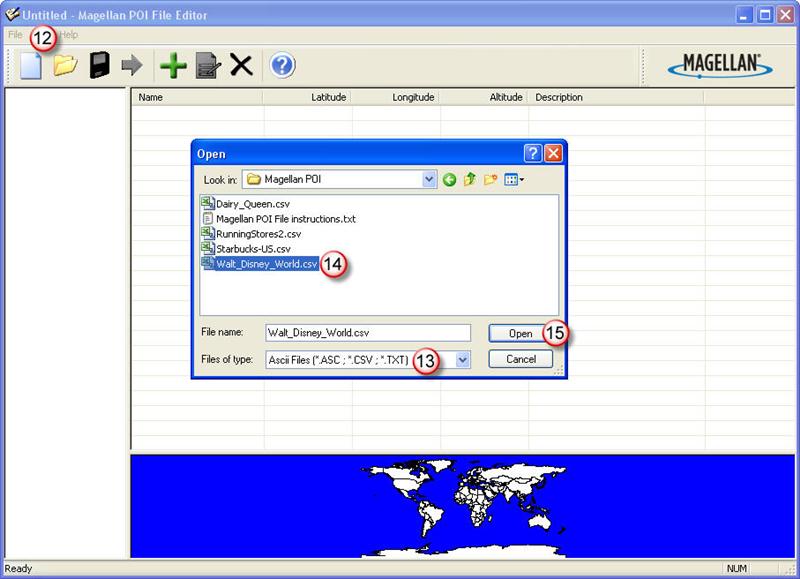
Open the Magellan POI Editor. Then open the .CSV file you previously created. As shown in (13) select .CSV since that is what you created last time (or should have). Select the file you created in (14), and then click on Open (15).

You did download the Magelan POI Editor from the earlier post…. correct? *Sigh*
Here it is again….

Download Magellan POI Editor – UPDATE 12/14/2015 this pointed to a link that was no longer valid so I removed it.

Magellan Maestro 3250 GPS Unit

Small and portable it can be used in the car or stuck in a pocket for pedistrian use – like walking around Disney World! (Batteries are supposed to be good for 3 hours or so.)

Okay, now that you downloaded the POI Editor, and know where it is at, go ahead and open the Magellan POI Editor. Then open the .CSV file you previously created. As shown in (13) select file type of .CSV since that is what you created last time (or should have). Select the file you created in (14), and then click on Open (15).


The Magellan POI File Editor - Open File dialog box.

Use the dialog box to browse to the .CSV file you previously created.


The software will automatically open the Import Wizard when it sees you open a .CSV file.

The software will automatically open the Import Wizard when it sees you open a .CSV file. Unless you have a “header” line that you saved (it the view window it would probably look different than the other data shown.) You should leave the “Start Importing from line = 1, set to 1. Some downloaded files have several rows of information about where the file came from, what’s included, who made it, etc. so you may need to change this to line 2, 3, or ?

Continue reading

Turkey Day Coming Up!

Okay, so I want to stuff my face with a big ‘ol turkey leg, stuffing, pumpkin pie, cranberry sauce, and not the real berries, that gooey stuff in a can… you know, where you cut out both ends of the can and the stuff sort of “oozes” out and lays there quivering. Yum!
But I don’t want to start putting on my annual “Holiday Pounds” already so… I entered the Detroit “Turkey Trot 10K” on November 27th, just before lunch! Burn it off…. pack in on!

November 27th, 2008 Detroit Michigan

So, hopefully the snow won’t be flying, and the temps are above 0 C. (Although it may help to keep the crowd down a little.) It looks like last year there were about 5-6000 runners in the two races. (A 5K and a 10K)

Double Left click on map to enlarge, double right click to reduce.
Click and drag to move map around.

Until the last gelatinous turkey leg is consumed,
George

Attempting to Create a Custom POI file – Part 1

The family goes down south to Disney World in Orlando every couple of years (well twice now….) we always have a good time there seeing all the sites and attractions. Also everytime I say “I wonder why there is no GPS Point Of Interest file available for download into a GPS unit”. This seems like a “natural” to me. Especially for persons having portable GPS units that want to get to an attraction in the shortest route possible from inside or outside of the park. So, I searched the internet and came up with one “Disney World POI” file… but it only has about six entries for the gates of the different theme parks… not so useful for what I want!

I decided to create my own file. No problem. Open the Magellan POI program and enter in the information that is required.

Oh, you don’t have Magellan POI File Editor software on your PC/Mac. Man, you are soooo out of luck.

It is supposed to be on the CD that came with your GPS. Being extremely lazy I did not even try to locate that CD… I just Googled until I found a link someone posted. Maybe I should be nice and add a link to let you download it from here….. we’ll see….

Magellan POI Editor UPDATE 12/14/2015 The link to the POI Editor no longer works so I have removed it. Try searching for this. Things are a lot easier now than when I originally posted the link. Not to mention the version I had posted is long out of date!


Magellan Maestro 3250 GPS Unit

Small and portable it can be used in the car or stuck in a pocket for pedestrian use – like walking around Disney World! (Batteries are supposed to be good for 3 hours or so.)

Seems simple enough, there are only about three things: Latitude, Longitude and Name for each POI. Oh, what is that information for each of those? Where do you get it? Hmmm… maybe not quite so easy after all. Open Google Earth, pan around until you find the location, zoom in to make sure it is right, copy the info from the screen into the Magellan POI program…. sort of time consuming. Maybe not such a great idea after all, but it seems like there should be a better way to do this.

A search found a web site forum with some hints, and a reference to another web site where you can do latitude and longitude lookups using an address, name, etc. Check this out –>
UPDATE 12/14/2015 This appears to no longer be working so I removed the link but you can copy and paste to try it. “itouchmap.com/latlong.html”. One thing it does others may not, reverse lookups… if you have a latitude and longitude plug them in and see where in the world it is at. Might be good for doing a “cross reference” check on points you have.

But, this is still a rather slow, copy and paste operation. Find the location, copy the info (a piece at at time) paste it into your file, add Name/Description and go to the next place. If you have a lot of points be prepared to spend some serious mousing time. So… there has to be a better way. Google to the rescue again! An extended search for: POI +file +create and some other terms and come up with a lot of nothing…. wait what is this one…. ITN Converter…. download it, install (cool it doesn’t “really” need to install, it is an executable that runs on it’s own. Even from a USB memory stick.)

So… does it work or not?

Continue reading